Quick take
Choose OLED for the deepest blacks, very fast pixel response, and cinematic gaming in a dark or controlled room. Choose a good Mini-LED TV for a bright living room, strong HDR highlights, and mixed family use. Choose QLED by specification, not by label: the term covers many LCD TVs, from basic 60Hz sets to premium gaming models.
The best gaming TV is not automatically the most expensive one. Your room lighting, seating, game preferences, and the exact capabilities of each HDMI input matter more than a single display-technology badge.
What matters most for PS5 and Xbox gaming?
Start with the gaming feature list, then compare picture technology. A television can produce an excellent image and still be a poor match for a console if it lacks the inputs or low-latency modes you need.
| Feature | Why it matters |
|---|---|
| 4K resolution | Produces a sharper image, especially on larger screens and at closer seating distances. |
| Native 120Hz panel | Lets supported games display at up to 120 frames per second and can improve motion clarity. |
| 4K at 120Hz input | Confirms that the TV can accept a high-resolution, high-refresh console signal through the relevant HDMI port. |
| VRR | Matches display refresh to changing frame output to reduce visible tearing and uneven motion. |
| ALLM | Lets a compatible TV switch automatically to its low-latency game mode. |
| Low input lag | Reduces the delay between a controller action and the result appearing on screen. |
PlayStation’s current PS5 video guide confirms support for 4K 120Hz output, VRR, and ALLM when the display and game support them. Xbox’s Series X|S comparison lists up to 120 FPS, variable refresh rate, and auto low-latency mode, with supported content and displays required.
Do not stop at “HDMI 2.1”
Check the TV manual for the exact resolutions, refresh rates, and gaming features supported by each port. Also count how many suitable ports remain after connecting a soundbar through eARC.
First, understand the labels
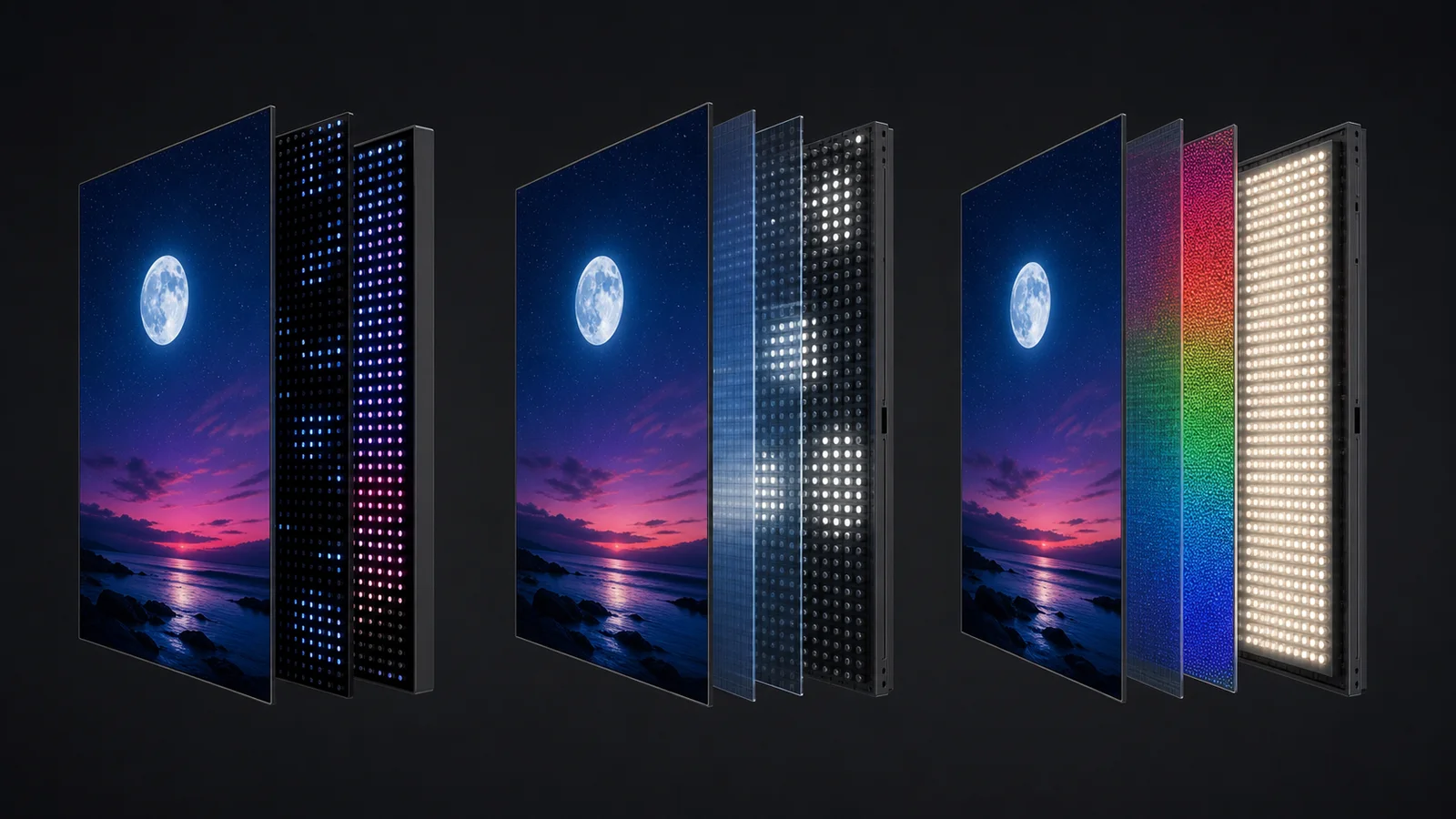
OLED, Mini-LED, and QLED are often presented as three direct alternatives, but the terms describe different parts of a display.
- OLED is self-emissive: each pixel creates its own light and can switch off individually.
- Mini-LED describes a dense LCD backlight divided into local-dimming zones.
- QLED is an LCD TV that uses a quantum-dot layer to improve color and brightness.
A TV can therefore be both Mini-LED and QLED. When you see “Neo QLED,” “QD-Mini LED,” or similar branding, read the detailed specification rather than assuming the categories are separate.
OLED: best for contrast and dark-room gaming
Because each OLED pixel controls its own light, black areas can be truly dark without a backlight glowing through them. That gives night scenes, space games, and cinematic single-player titles a convincing sense of depth. Pixel response is also very fast, which helps moving objects stay clean.
OLED is a strong fit for
- Dark or dim rooms with controlled reflections.
- Story-driven, horror, space, and cinematic games.
- Fast games where clean motion and quick pixel response matter.
- People who also prioritize movies and high-contrast streaming.
OLED trade-offs
Bright-room performance varies widely by model, screen finish, and OLED generation. Persistent static elements can also cause uneven wear over a long period. Modern TVs include protective features, but it is still sensible to leave pixel-shift and panel-care options enabled and avoid keeping a paused game or fixed HUD on screen unnecessarily for very long periods.
Mini-LED: best for bright rooms and mixed use
Mini-LED TVs are LCD displays with many small backlights grouped into local-dimming zones. The extra control can deliver strong contrast while retaining the high full-screen brightness that works well in daylight, with sport, and in a busy family room.
Mini-LED is a strong fit for
- Bright living rooms and daytime gaming.
- High-impact HDR highlights and sports viewing.
- Households that mix games, TV, news, and streaming.
- Long sessions with persistent scoreboards or game interfaces.
Mini-LED trade-offs
Local dimming works in zones rather than per pixel. A bright object, subtitle, or crosshair against a dark background can produce a visible halo called blooming. The severity depends on the number and control of the zones, the panel, processing, viewing angle, and picture mode—not simply whether “Mini-LED” appears on the box.
QLED: judge the individual model
QLED uses quantum dots in an LCD display to support strong color and brightness. It is not the opposite of Mini-LED, and it does not guarantee a specific refresh rate, backlight, black level, input lag, or number of gaming ports.
QLED models span a broad price range. Some affordable sets are limited to 60Hz and basic backlighting, while higher-end models add Mini-LED local dimming, native 120Hz or 144Hz panels, VRR, and several capable HDMI inputs.
Before buying any QLED TV, check
- Whether the panel is natively 60Hz, 120Hz, or 144Hz.
- Whether it accepts 4K at 120Hz on the ports you plan to use.
- Which VRR formats and refresh-rate range it supports.
- Game Mode input lag at the resolution and refresh rate you use.
- How many suitable HDMI ports are available alongside eARC.
OLED vs Mini-LED vs QLED: quick comparison
| Category | OLED | Mini-LED LCD | QLED LCD |
|---|---|---|---|
| Black level | Excellent | Good to excellent; model-dependent | Varies by backlight and local dimming |
| Bright-room viewing | Good to excellent; model-dependent | Often excellent | Varies widely |
| Pixel response | Very fast | LCD-dependent | LCD-dependent |
| Blooming | None from a backlight | Possible | Possible on locally dimmed models |
| Static-image concern | Manage long-term uneven wear | No OLED-style burn-in | No OLED-style burn-in |
| Best shorthand | Dark-room contrast | Brightness and mixed use | A color technology; verify the full spec |
Is 120Hz important for PS5 and Xbox?
It matters when the game and console output support it. A 120Hz mode can make shooters, racers, fighting games, and other fast titles feel smoother and more responsive. Many games still target 30 or 60 frames per second in their highest-quality modes, so a 120Hz label does not improve every game automatically.
Look for a native 120Hz panel and explicit support for the signal you want. Marketing phrases such as “motion rate,” “game accelerator,” or “effective refresh rate” may not mean native 4K at 120Hz.
How to choose for your room
- Dark room + cinematic games: start with OLED.
- Bright room + sport + family use: start with Mini-LED.
- Lower budget: compare QLED and standard LED models, but prioritize a native 120Hz panel, VRR, and low input lag if gaming is important.
- Competitive gaming: prioritize verified 120Hz support, VRR behavior, and measured input lag over the display label.
- Wide seating: compare off-axis picture quality in person or through trustworthy measurements; panel behavior varies.
Final verdict
OLED is the easiest recommendation for deep blacks, clean motion, and controlled-room gaming. Mini-LED is often the more practical all-round choice for a bright shared room. QLED is not one performance tier: it can describe an affordable LCD or a premium Mini-LED gaming TV, so the model’s actual panel, backlight, ports, and game mode must make the decision.
Choose the room first, the gaming features second, and the display label third.
Make a compatible smart TV easier to control.
TV Remote Control: Xio brings remote buttons, touchpad navigation, keyboard input, app shortcuts, and media casting to iPhone and iPad over the same Wi-Fi network.
See TV Remote Control: XioThis independent editorial guide is for general buying education. Softlian is not affiliated with or endorsed by Sony Interactive Entertainment, Microsoft, Xbox, or any TV manufacturer. Features, terminology, and compatibility vary by model, firmware, game, region, and connection chain; verify the current manufacturer specifications before buying.
More TV guides